Healthcare Website Design Best Practices Build a Website That Converts Visitors into Patients
When patients need medical care, their search almost always begins on a screen. Whether looking for a local family dentist, a specialist, or an urgent care center, modern patients evaluate a medical practice through its digital front door long before walking through the physical one. Consequently, a practice’s website serves as the primary touchpoint for building trust, providing critical information, and securing new appointments.
However, having an online presence is no longer enough. Many medical practices invest significantly in marketing to attract site visitors, only to lose them because their website is slow, difficult to navigate, or confusing on a mobile phone. To succeed in today’s competitive landscape, healthcare web design must do more than look attractive; it must deliver an intuitive, secure, and seamless user experience.
This guide explores the essential healthcare website design best practices required to build a high converting digital platform that transforms casual visitors into loyal patients.
Why Healthcare Website Design Matters?
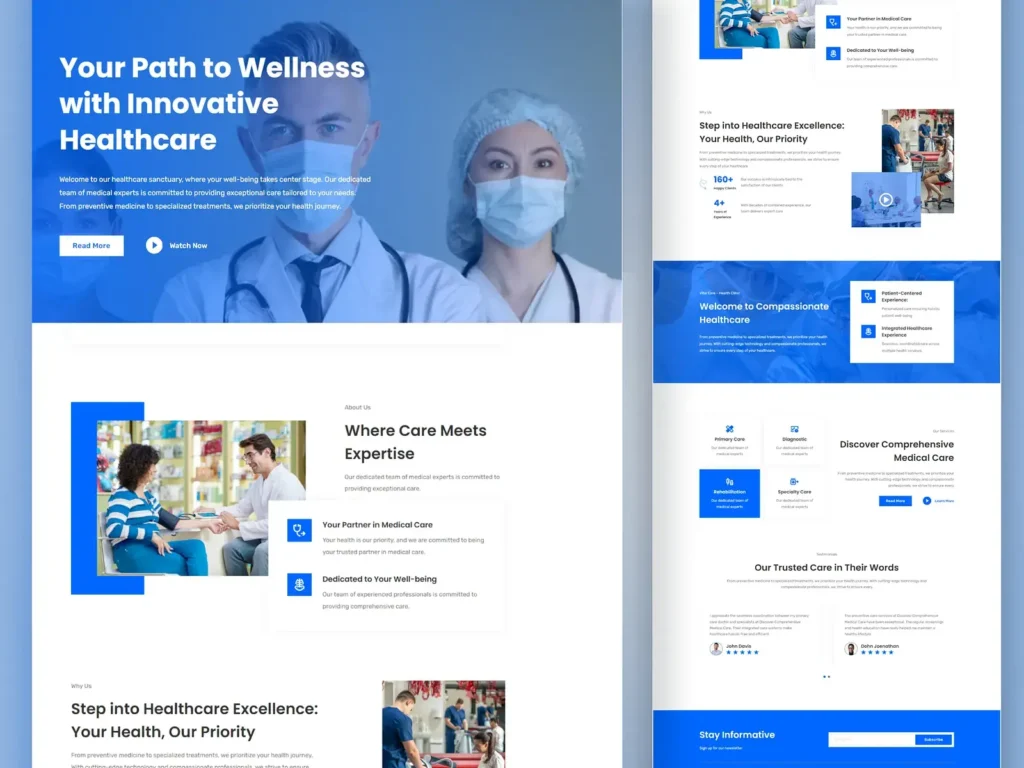
In the healthcare industry, a website is far more than a digital brochure. Instead, it operates as a direct reflection of a practice’s standard of care, professionalism, and operational efficiency. Furthermore, prospective patients often project their online experience onto the quality of medical treatment they expect to receive.
A poorly designed website with hidden contact details, slow loading times, or broken forms creates friction and anxiety. In contrast, a modern, well structured website communicates reliability, empathy, and credibility instantly.
Beyond aesthetics, strategic medical website design directly impacts practice revenue by streamlining patient acquisition. When a website clearly communicates expertise, addresses common patient concerns, and offers an effortless scheduling process, it converts passive searchers into confirmed appointments.
Patient First UX (User Experience)
Patient first user experience design focuses on understanding the mental state of someone searching for healthcare. Visitors arriving at a medical website are often anxious, in pain, short on time, or seeking immediate answers for a family member. Therefore, the user journey must be completely effortless and stress-free.
To create an empathetic patient first UX, consider these foundational elements:
- Clean Navigation: Keep primary menu options simple and intuitive. Use standard labels like Services, Providers, Locations, Insurance, and Contact so visitors do not have to guess where to click.
- Clear Visual Hierarchy: Structure content using prominent headings, bullet points, and high-contrast call-out boxes to ensure key information is easily scannable.
- Prominent Contact Information: Place phone numbers, address details, and emergency notices in the top header on every page.
- Search Functionality: Incorporate an internal search bar to help users quickly locate specific conditions, doctors, or treatments.
Mobile Responsiveness & Mobile First Design
More than 60% of healthcare related online searches occur on mobile devices. Whether someone is searching for an emergency clinic while on the go or checking doctor profiles during a lunch break, a seamless mobile interface is non negotiable.
Mobile first healthcare web development ensures that the user experience is designed for smaller screens from the very beginning, rather than downsized as an afterthought.
In order to optimize for mobile devices, prioritize thumb friendly navigation where essential buttons like “Call Now” or “Book Online” are easy to tap. Additionally, ensure phone numbers are hyperlinked for one tap dialing and that layouts automatically reformat without requiring horizontal scrolling or zooming.
Website Speed and Performance
Website speed directly influences both patient satisfaction and conversion rates. Research indicates that if a medical website takes longer than three seconds to load, over half of its visitors will abandon the site and click on a competitor’s link instead. Additionally, search engines like Google use page speed as a primary ranking factor.
To ensure your clinic website design maintains optimal performance:
- Compress Media Files: Optimize images and embed videos through professional third-party hosting platforms to prevent slow page load times.
- Minimize Code: Clean up bloated scripts, minimize CSS and JavaScript, and utilize browser caching.
- Use a Content Delivery Network (CDN): Distribute website assets across global servers so local users receive rapid loading speeds regardless of traffic volume.
- Choose Reliable Healthcare Hosting: Invest in secure, high performance hosting environments tailored to handle traffic spikes safely.
Seamless Online Appointment Booking
The modern healthcare consumer expects the same digital convenience from their medical providers that they receive from banking or retail applications. As a result, integrated online scheduling has shifted from a luxury feature to a core patient expectation.
An effective online booking system should allow new and returning patients to select a provider, choose a location, view real-time availability, and secure a time slot within a few simple clicks.
In addition to improving patient convenience, automated scheduling lightens the administrative load on front desk staff, reduces phone queue wait times, and lowers appointment no show rates through automated SMS or email reminders.
HIPAA and Privacy Considerations
Unlike standard corporate websites, medical platforms handle sensitive personal data. Consequently, compliance with privacy regulations such as HIPAA in the United States or equivalent local data protection laws is a fundamental requirement of healthcare web design.
Practices must ensure that all patient interaction points protect confidentiality:
- Encrypted Data Transmission: The entire website must utilize HTTPS with an active SSL certificate to secure data sent across the web.
- Secure Patient Forms: Online contact forms, consultation requests, and medical history submissions must be encrypted and stored in HIPAA-compliant databases.
- Third-Party Tool Audits: Ensure that analytics trackers, live chat widgets, call tracking tools, and advertising pixels do not inadvertently capture or transmit Protected Health Information (PHI).
- Business Associate Agreements (BAAs): Obtain signed BAAs from web hosting providers, form builders, and software vendors that handle patient data.
Digital Accessibility (ADA Compliance)
Healthcare services must be accessible to everyone, including elderly individuals, individuals with temporary injuries, and people with visual, auditory, cognitive, or motor impairments. Building an accessible website is not only an ethical responsibility, but it also protects practices from legal liability under ADA (Americans with Disabilities Act) guidelines.
To ensure your healthcare web design aligns with Web Content Accessibility Guidelines (WCAG):
- Maintain Strong Color Contrast: Ensure text stands out clearly against background colors for readers with visual impairments.
- Provide Screen Reader Support: Use descriptive alt text for all images and implement proper HTML heading structures.
- Enable Keyboard Navigation: Ensure users can navigate through menus, buttons, and forms using only the keyboard.
- Offer Scalable Text: Design layouts that allow users to increase font sizes without breaking the visual structure of the page.
Building Trust Signals and Credibility
Selecting a healthcare provider requires a high level of personal trust. Therefore, a successful healthcare website design actively incorporates visual and content based trust signals throughout the patient journey.
For instance, embedding verified Google reviews and patient testimonials helps validate the quality of care through real experiences. Furthermore, featuring professional, high-resolution photos of doctors and staff humanizes the practice and reduces patient anxiety. Displaying badges from accredited medical boards and clearly listing accepted insurance plans also helps eliminate financial uncertainty before booking.
SEO Friendly Website Structure
A beautifully designed website brings little value if prospective patients cannot find it through search engines. Integrating Search Engine Optimization (SEO) directly into the architectural layout of your healthcare web design ensures long-term organic visibility.
An SEO friendly medical website structure relies on clear organization:
- Logical Page Hierarchy: Organize content intuitively from general services down to specific procedures.
- Clean URL Structures: Use readable, keyword-rich URLs for every page.
- Internal Linking: Connect related service pages, condition guides, and provider profiles naturally to guide both visitors and search engine crawlers.
- Optimized Metadata: Draft unique meta titles, descriptions, and header tags for every page on the site.
Conversion Focused Landing Pages
While the homepage introduces the practice generally, dedicated landing pages are designed to convert visitors arriving from specific marketing campaigns, such as Google Ads, social media campaigns, or targeted search queries.
For instance, a patient searching for emergency root canal treatment should land directly on a dedicated emergency endodontic page rather than a general practice homepage.
A high converting healthcare landing page includes a clear headline matching search intent, targeted copy focusing on treatment benefits, relevant social proof, and a single primary call to action directing the visitor to call or schedule an evaluation.
Conversion Rate Optimization (CRO) Strategies
Conversion Rate Optimization (CRO) involves continuously testing and refining website elements to turn a higher percentage of visitors into booked appointments.
To maximize your conversion rates:
- Use High Contrast Action Buttons: Make scheduling and contact buttons stand out visually using distinct brand colors.
- Keep Forms Short: Limit contact forms to essential fields like name, phone, email, and preferred date to minimize form-fill fatigue.
- Incorporate Sticky Headers: Keep booking buttons visible at the top of the screen as the user scrolls down long pages.
- Highlight Same Day Availability: If your clinic accepts urgent cases or walk-ins, highlight this capability prominently on high-intent service pages.
Essential Pages Every Clinic Website Needs
To deliver a complete patient experience, every clinic website design should include a core set of fundamental pages:
- Homepage: The central hub presenting your practice’s core identity, key services, main location details, and primary booking calls to action.
- Dedicated Service Pages: Individual pages detailed around specific treatments, explaining conditions treated, procedure steps, and FAQs.
- Provider Directory & Profiles: Dedicated bio pages for each doctor detailing their education, board certifications, specialties, and personal philosophy of care.
- Location & Contact Pages: Individual pages for every clinic location featuring maps, driving directions, parking instructions, public transport routes, and operating hours.
- Patient Info & Insurance Page: Clear details explaining insurance acceptance, payment plans, telehealth options, and downloadable new patient intake forms.
- Patient Reviews & Case Studies: A dedicated space highlighting patient testimonials, video stories, or before and after treatment transformations.
Ongoing Website Maintenance and Security
Healthcare web development does not end on launch day. A medical website requires continuous updates, security monitoring, and content maintenance to remain secure, fast, and compliant.
Essential maintenance tasks include:
- Regular Core Updates: Keeping the Content Management System (CMS), themes, and plugins updated to prevent security vulnerabilities.
- Automated Backups: Performing daily or weekly off site backups to ensure rapid recovery in case of technical issues.
- Continuous Security Scanning: Monitoring the site regularly for malware, unauthorized login attempts, or broken links.
- Routine Content Reviews: Updating doctor bios, operating hours, accepted insurance plans, and clinical information regularly so patients always receive accurate information.
Healthcare Website Design Checklist
Before launching or updating your practice website, confirm that your platform covers these essential requirements:
- Fully responsive and mobile friendly layout
- Page load speed under three seconds
- SSL encryption and HIPAA compliant patient forms
- ADA accessibility compliance following WCAG standards
- Direct online appointment scheduling integration
- Click to call phone numbers in the header
- Individual service and location pages with clean URLs
- Prominent patient reviews and provider credentials
- Clear insurance and payment information
- Active security monitoring and routine backup systems
Build a High Converting Medical Website With Rankeoure
A successful healthcare website is more than an online profile. It is a dependable driver of practical growth. By combining patient first design, mobile responsiveness, strong privacy standards, and conversion optimization, your practice can create an online experience that builds lasting trust and attracts qualified patients consistently.
At Rankeoure, we specialize in healthcare digital marketing and custom web development designed specifically for medical practices, clinics, and healthcare organizations. From building HIPAA compliant platforms and optimizing page speed to executing targeted local SEO strategies, we ensure your website functions as a powerful, round the clock patient acquisition system.
Transform your digital presence today. Partner with Rankeoure to build a modern healthcare website that elevates your brand, enhances the patient experience, and drives measurable practice growth.